
Totals 1.7: your backups, in your own Telegram
Totals 1.7 is here. The rule hasn't moved: your financial data lives on your phone, not on our servers. This release stretches that rule further: encrypted backups in your own Telegram, refunds that stop inflating your budgets, and bank statements you generate yourself. Plus a serious cleanup for anyone juggling multiple accounts.
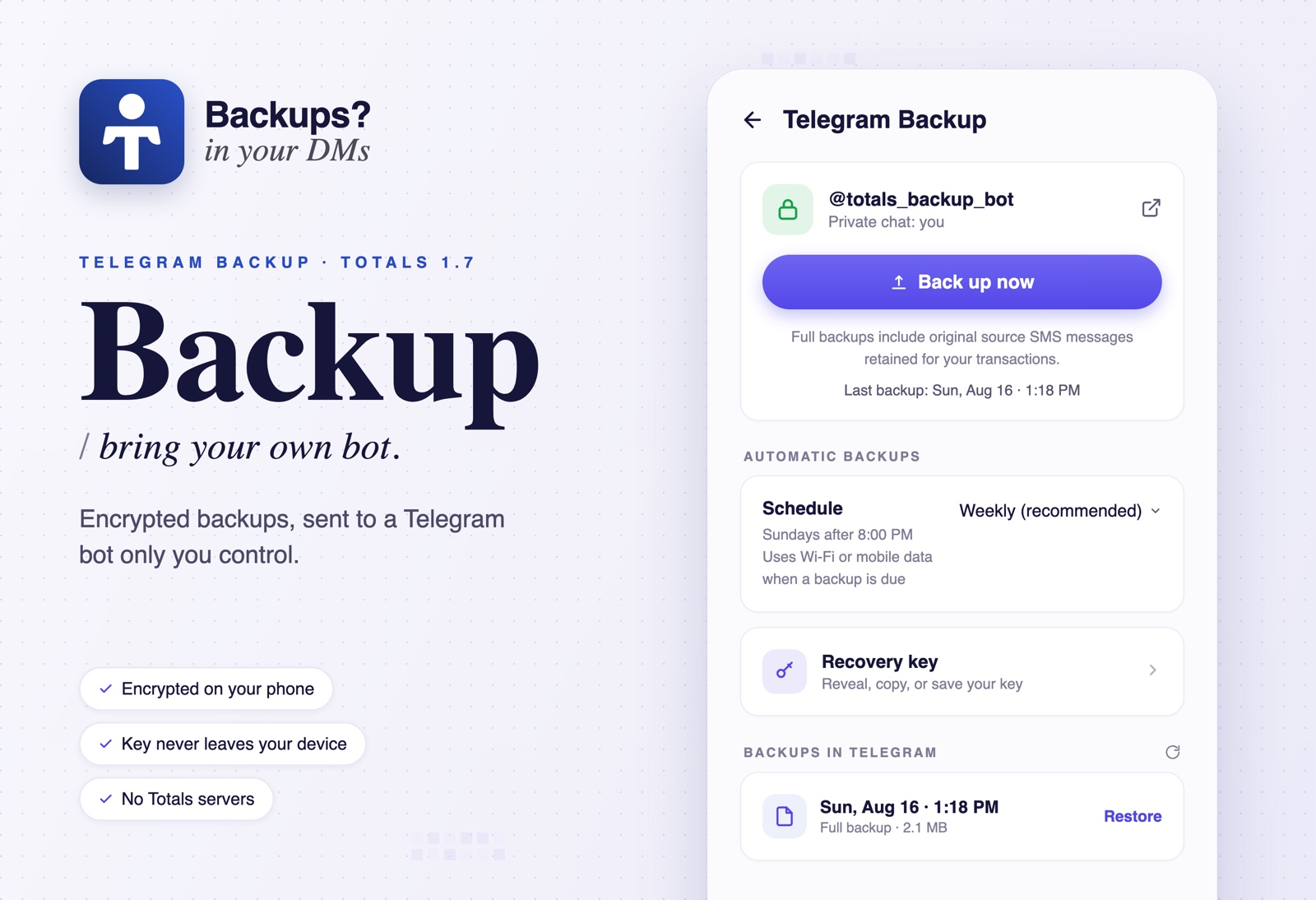
Telegram Backup: your data, your bot
Losing your phone shouldn't mean losing your history. But we're not going to run a backup server, because then your data would sit on someone else's machine, and that's the one thing Totals refuses to do.
So 1.7 does it the Totals way: automatic encrypted backups sent to a private Telegram bot that only you control.
Setup takes two minutes:
- Create a bot with @BotFather, Telegram's official bot for making bots.
- Paste the bot's token into Totals (Settings → Advanced → Telegram Backup).
- Open your bot, tap Start. Paired.
The fine print, because this is us:
- Backups are encrypted on your phone with AES-256-GCM before anything is uploaded. Telegram only ever stores ciphertext.
- The recovery key is generated on your device and never uploaded. Copy it or save it as a file, and keep it safe: restoring on a new phone needs the bot token and the key.
- There is no Totals server in the path. Your phone talks to Telegram. That's it.
Back up manually, daily, or weekly (weekly is the default we suggest). Backups cover everything: accounts, transactions, categories, budgets, loans and debts, auto-categorization rules, Quick Access accounts, even the original SMS messages behind your transactions. Browse the backups in your bot chat and restore any of them from inside the app.
Reimbursements: paid back isn't income
A friend sends back their half of dinner. Your bank calls it income. It isn't, and now your reports lie twice: spending too high, income too high.
1.7 fixes this properly. Categorize an incoming credit as a Reimbursement and link it to the expense it pays back. Split one credit across several expenses, or let one expense collect partial paybacks over time. Budgets, analytics, insights, recaps, wrapped, and widgets all subtract the reimbursed portion, so they show what things actually cost you. The main balance card keeps telling the truth about cash: money out stays money out, money in stays money in. Change your mind? Unlink it and the credit counts as normal income again.
Shoutout to dre for the idea behind the reimbursement flow.
Generate your own bank statement
Pick an account, confirm the account holder's name, choose a date range, and Totals builds a proper PDF statement: opening and closing balance, total debits and credits, and every transaction with its reference and a running balance. It's produced entirely on your phone from your own records, then you save or share it.
Multiple accounts at one bank, updated
If you keep two accounts at the same bank, you know the pain: the SMS only shows part of an account number, and transactions land on the wrong card. 1.7 reworks transaction ownership from the ground up. Totals now assigns a transaction to an account only when it has real evidence, using stronger account identity and masked-number matching. Anything ambiguous waits in Other transactions, where you can select items in bulk and move them where they belong.
Accounts also grew proper controls: set a default, exclude one from your total balance, mark old ones dormant (no more stale balances on their cards), reparse, generate a statement, or delete. Transfers between your own accounts are now treated as moves between pockets, separate from income and spending.
Where did the money go?
Tap an account's balance card to open a full credit/debit breakdown: received from others, moved in from your own accounts, paid out, moved out to your own accounts, fees and VAT, and unreconciled adjustments. A new balance mismatch ledger lists every period where your transaction history disagrees with the balance your bank reported, so you can chase down the gap instead of shrugging at it. And the app now says Money Flow instead of Cash Flow, with Cash Wallet no longer mixed into your total account balance.
Loans & debts, redesigned
The Loans & Debts page got a full redesign: how much you're owed, how much you owe, and a page per person with your net balance and a combined timeline of loans, debts, and repayments. Search and filter by direction, status, person, bank, amount, or date. Long histories scroll continuously instead of asking you to page through them.
Categorize in bulk
Long-press a transaction to start selecting, grab as many as you like, and categorize them together. Mixed selection? Pick one category for the debits and another for the credits. New categories can be created right from the sheet, and categorizing a transaction clears its notification.
Better notifications
Notifications are more reliable in release builds. Transfers between your own accounts no longer ping you, duplicate shared-expense notifications are gone, and categorizing a transaction clears its notification instead of leaving it hanging.
Export, import, and Clear Data, piece by piece
Exports can now be scoped to specific banks or wallets, limited to a date range, and trimmed to the sections you want: budgets, rules, loans and debts, Quick Access accounts, diagnostics. Import shows a preview first (export date, what's inside, how much of it) and lets you choose which parts to bring in. Clear Data dropped its all-or-nothing attitude too: wipe one bank, or just the budgets, and keep everything else.
Discover Totals
A new section in Settings that shows off what the app can do, with short video guides instead of walls of text. The first three cover Auto-Categorization, Quick Account Access, and Linking Reimbursements.
Also new
- Reparse, on your terms: select several accounts (Other transactions included) and reparse them in one guided run. Toggle what happens: refresh existing transactions, import missed ones, apply your rules, or repair credit/debit directions from legacy imports, with a start date to limit the scope and per-account results at the end. Faster too, especially on large histories.
- Account Hub: long-press Shared in the bottom nav to search saved Quick Access accounts, copy any of them with one tap, or share your own accounts as a QR code.
- App icon shortcuts (Android): long-press the Totals icon for Add Expense, Add Income, Quick Accounts, or Verify Payments. Labels in English and Amharic.
- Faster startup: less work at launch, so the app is usable sooner. Main-page and navigation transitions were smoothed out too.
- Clearer onboarding: permission screens explain SMS access properly, with battery-optimization guidance so background processing keeps working. Unnecessary Android media permissions are explicitly excluded.
- Telebirr credit receipt links work again, shared-expense amounts can be copied, and bottom sheets and keyboards behave better across the app.
Get it: update on the Play Store, or get it on the App Store.
Totals is open source, Telegram Backup included: github.com/detached-space/totals
Questions, bugs, love letters: t.me/totals_chat